
GPD Win Max 2 — my portable dev machine that keeps AI worker bees moving

TL;DR (my final word): I bought the Win Max 2 to replace my floppy Surface‑style setup, and it delivered: it’s stable, type‑able, and portable in a way that actually works on my lap, the couch, or an airplane tray. It’s first and foremost a portable development machine that lets me run agents, code, and remote into my desktop with ease. The power is there when I need it, and gaming is a nice bonus I’ll explore later, but for me, portability and stability are the real wins.
Why I wanted it (developer first, gamer third)
I needed something super portable that wouldn’t tether me to my desk while I’m keeping AI agents (e.g., Gemini JULES) humming, triaging code, and hopping into Parsec to remote back into my main desktop. Around the house, watching the kids, out on the patio, or on the couch, the clamshell form is simply more practical than a kickstand tablet. On planes, it sits solidly on a tray table without the origami routine my Surface demanded. Portability first, power second, gaming a "to be explored" third, and the Win Max 2 fits that order perfectly.
What it is (and why it works for me)
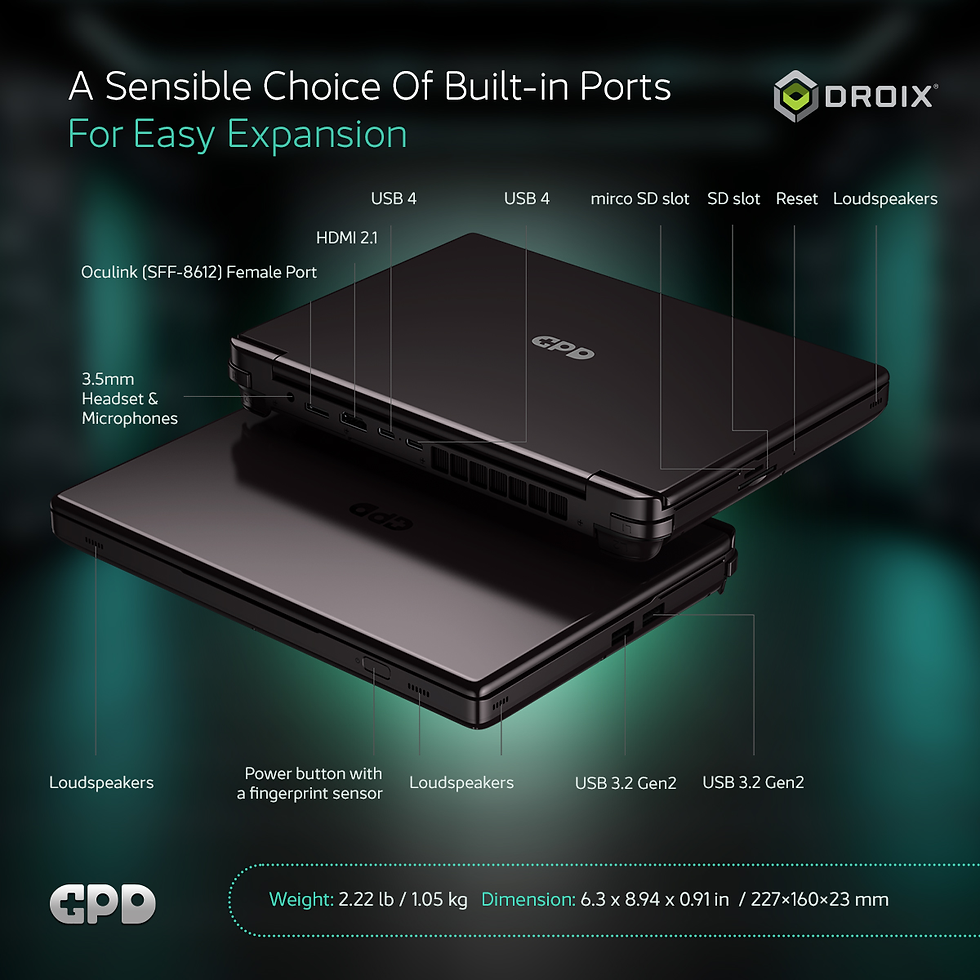
The Win Max 2 is a 10.1‑inch mini‑laptop with a real keyboard/trackpad and integrated gamepad controls tucked into the deck. The 2025 refresh offers Ryzen AI 9 HX 370 or Ryzen 7 8840U options, USB4, OCuLink for direct‑PCIe eGPU use, dual NVMe (2280 + 2230) storage, and a 2560×1600 60 Hz touchscreen. In short: a tiny laptop that doesn’t compromise on I/O, and can scale up with an eGPU if you ever want to. GPD Gaming Handhelds+2GPD+2
Specs at a glance • 10.1" 2560×1600 IPS touch, 60 Hz (2025 model bumps brightness to ~450 nits). • AMD Ryzen AI 9 HX 370 or Ryzen 7 8840U; up to 64 GB LPDDR5x and up to 4 TB NVMe. • Robust I/O: 2× USB4 (2025), HDMI 2.1, SD + microSD, OCuLink (SFF‑8612), 3.5 mm jack. • 67 Wh battery. • 4G LTE module (had to purchase this after the fact) for always‑connected portability.
Portability & ergonomics (Human Factors notes)
At ~1.05 kg, it’s dense but not fatiguing on a lap or held at chest height. More importantly, it’s stable—no kickstand gymnastics, no floppy keyboard covers. The clamshell hinge and base let me type on the couch or a plane without hunting for a flat, deep surface. That alone changed how often I pick it up to, since i can effectively grab it by the screen to carry it (whether I should or not another discussion).
Two small irritations
Rear shoulder/under buttons: I hit one by accident sometimes and trigger a screenshot while moving around. Not a deal‑breaker—just mildly annoying while working on my lap. (They’re mappable back buttons, so a remap/disable is a quick fix.)
Edge‑to‑edge touch: The near‑bezel‑less touch means grabbing the screen from the top‑right can tap the close X. Easy habit fix: grab from the top edge center or the chassis.

Display & typing
For development and remote desktop sessions, the 2560×1600 panel is sharp and perfectly fine at 60 Hz. I’m not chasing high‑refresh on a 10‑inch dev rig; text clarity and scaling matter more.
Connectivity convenience via the LTE add‑on
I added the optional 4G LTE module and love it so far. Being able to maintain connectivity by the pool (where my Wi-Fi is spotty) while code pushes and agents keep churning and without babysitting a phone hotspot is great. Setup was a bit of a pain (having to open it up to attach the module to the main PCB), and the module supports cheap pre-paid SIM cards.

Performance & my workflow
I mainly use the Win Max 2 to run agents, do local dev, and remote into my desktop via Parsec. For that, both the 8840U and HX 370 variants have more than enough headroom; the fans spin up under load (as expected) but day‑to‑day it simply works.
Battery & noise
Battery isn’t my priority here, it just has to keep me mobile for a few hours between outlets. The 67 Wh pack gets the job done for my dev/remote mix; gaming will drain it faster (as always).
Gaming (the honest note)
I haven’t stress‑tested games yet; when I travel, I’m more likely to unwind with Baldur’s Gate or lighter sims (shoutout to TCG Card Shop Simulator) than chase high‑refresh shooters. The 60 Hz screen and integrated controls are fine for that.
The good, the quirks, the fit
What I love
Lap/tray stability and real typing comfort in a small footprint.
LTE add‑on = go‑anywhere dev box without tethering to my phone.
I/O abundance and the option to scale with OCuLink/USB4 later.
What could be better
The rear/under buttons can be easy to bump (I’ll eventually remap).
Edge‑to‑edge touch means mindful grabs from the lid.
Who it’s for
Devs and tinkerers who value portable, lap‑friendly computing with legit I/O and always‑connected options.
Folks who want a tiny laptop first and a handheld second.
Who should pass
High‑refresh esports folks or anyone trying to consolidate into a single dock‑first PC. A thin‑and‑light with a discrete GPU (or a Steam Deck/RoG Ally‑style device) might fit better.
Bottom line (my final word, again)
I bought the Win Max 2 to replace my floppy Surface‑style setup, and it delivered: it’s stable, type‑able, and portable in a way that actually works on my lap, the couch, or an airplane tray. It’s first and foremost a portable development machine that lets me run agents, code, and remote into my desktop with ease. The power is there when I need it, and gaming is a nice bonus I’ll explore later—but for me, portability and stability are the real wins.


Comments